
Your AVPro EDID-X Stops the Lies.
And why a dumb little box with four switches belongs behind every display you put in the field.
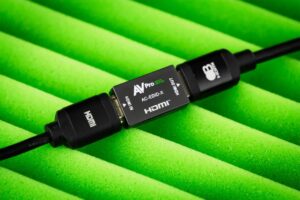
Let’s work backwards from the ending. You’ve mounted up a new TV. Apple TV is connected. All secure. You sit down. And…everything works. The picture is beautiful, the sound is great, you watch a movie, life continues. Ob-la-da.
So you naturally take that moment to question the deeper meaning to your success: “What really is up with all the little boxes all the other AV guys are screwing with?” Well – that’s just a great question. And it really is because HDMI was designed by drunken raccoons in a committee meeting.
And it isn’t the first day that’s the problem. It’s Day 117. Day 117 is when the TV gets a firmware update. Or the Apple TV gets one. Or the AVR gets one. Or the power goes out. Or your profoundly significant other unplugs something. Maybe the neighbor kid plugs a Nintendo into the wrong input. Or Mercury enters retrograde. Or the moons and winds in Rangoon shift subtly toward the East.
Or literally nothing happens at all — and your perfectly functioning system wakes up one morning and decides violence is the answer.
A Conversation Between Two Liars
Here’s what most people don’t realize: every time you turn on a TV, there’s a conversation happening.
The source asks, “What are you?” The TV answers, “I’m a TV.” The source says, “Cool — what can you do?” The TV says, “Well… sometimes Dolby Vision. Sometimes HDR. Some audio formats. Depends what mood I’m in.” The source says, “Good enough.”
And that’s how your entire system is built. On a conversation between two liars.
Because every manufacturer interprets HDMI differently. Every manufacturer interprets EDID differently. Every manufacturer interprets Dolby Vision differently. And every one of them swears their implementation is the correct one. Which is exactly why every integrator reading this has stared at a black screen while quietly questioning their career choices.
Your entire entertainment system is at the mercy of a conversation between two confirmed liars.
Day 117 and the Art of Looking Stupid
The symptoms are always weird. The TV randomly comes up in 1080p. Atmos disappears. The picture blinks. The screen goes black for three seconds every time the content changes. The customer swears it worked yesterday. You know it worked yesterday. Everybody knows it worked yesterday. But today? Today HDMI chose chaos.
And here’s the thing that makes it so infuriating: most systems work. Most of the time. If everything failed all the time, we’d know exactly where to look. Instead, HDMI fails just often enough to make you look stupid. It’s the AV equivalent of a smoke detector chirping once every six hours — you start wondering if you’re the crazy one.
The real pros eventually figure something out. The job isn’t building systems. The job is eliminating variables.
EDID Is Just the TV’s Résumé
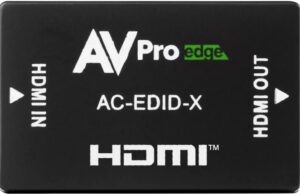
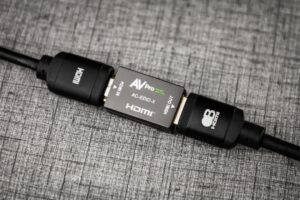
Every little tool in the van exists because somebody got burned. Signal generators. Cable testers. Fox & Hounds. Network analyzers. EDID managers. And that’s where a box like the AC-EDID-X earns its keep.
Because EDID is really just the TV’s résumé. It’s a tiny block of information that tells the source what resolutions, frame rates, HDR formats, and audio formats the display claims to support. In theory, the source reads the résumé and behaves accordingly.
In reality? Sometimes the TV lies. Sometimes the AVR lies. Sometimes the matrix switch lies. Sometimes everybody tells the truth and HDMI still finds a way to ruin your day.
The EDID-X exists because installers get tired of negotiating with unstable electronics. Instead of letting the devices argue with each other every time they wake up, you force the conversation. The source asks, “What can you do?” and the EDID-X answers, “This is what we’re doing today.” No debate. No confusion. No existential crisis.
Four Switches. That’s the Whole Interface.
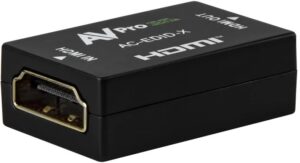
One of the best parts is that it doesn’t take a computer science degree to run. The front has physical DIP switches — actual little toggles even my fat fingers can operate. You flip them to pick a predefined EDID profile: 4K, HDR, frame rate, audio channels. No software rabbit holes. No mystery menus buried six layers deep. No downloading a utility that only runs on the laptop you left back at the shop. You look at the chart, move the switches, and tell the system what reality is going to be.
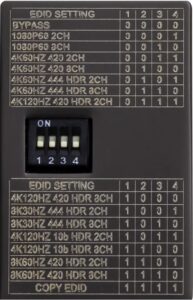
EDID profiles — switch positions (0 = down/off, 1 = up/on)
| EDID Setting | 1 | 2 | 3 | 4 |
|---|---|---|---|---|
| Bypass | 0 | 0 | 0 | 0 |
| 1080p60 · 2CH | 0 | 0 | 0 | 1 |
| 1080p60 · 8CH | 0 | 0 | 1 | 0 |
| 4K60 4:2:0 · 2CH | 0 | 0 | 1 | 1 |
| 4K60 4:2:0 · 8CH | 0 | 1 | 0 | 0 |
| 4K60 4:4:4 HDR · 2CH | 0 | 1 | 0 | 1 |
| 4K60 4:4:4 HDR · 8CH | 0 | 1 | 1 | 0 |
| 4K120 4:2:0 HDR · 2CH | 0 | 1 | 1 | 1 |
| 4K120 4:2:0 HDR · 8CH | 1 | 0 | 0 | 0 |
| 8K30 4:4:4 HDR · 2CH | 1 | 0 | 0 | 1 |
| 8K30 4:4:4 HDR · 8CH | 1 | 0 | 1 | 0 |
| 4K120 10-bit · 2CH | 1 | 0 | 1 | 1 |
| 4K120 10-bit HDR · 8CH | 1 | 1 | 0 | 0 |
| 8K60 4:2:0 HDR · 2CH | 1 | 1 | 0 | 1 |
| 8K60 4:2:0 HDR · 8CH | 1 | 1 | 1 | 0 |
| Copy EDID | 1 | 1 | 1 | 1 |
Transcribed from the chart on the unit. Confirm against your shipping label before you swear to it — profiles can shift by firmware rev.
Two of those modes are the ones you’ll reach for most:
- Bypass (0·0·0·0) — pure passthrough. Flip here to A/B test and prove the box is the thing making the difference.
- Copy EDID (1·1·1·1) — clone the résumé off a display you know behaves, then lock it into the chain so everything downstream sees that same known-good answer.
Everything between those two is you picking a ceiling on purpose: match the profile to what the room can actually do, lock it, walk away. One caution — don’t force a mode the display can’t honor. Locking 4K120 to a 60Hz panel doesn’t make it a 120Hz panel; it just hands you a fresh black screen. Match the channel count to what your audio sink really is, too — don’t advertise 8-channel Atmos to a source feeding a stereo TV. Tell the system the truth about reality. Just the version of the truth that doesn’t change every morning.
Why One Belongs Behind Every TV
Here’s where I’ll go further than the video did.
The instinct is to treat a box like this as a troubleshooting tool — something you grab after the call comes in. Reactive. Break-glass-in-case-of-emergency. That’s backwards.
You don’t know which install is going to become the Day 117 install. The failures don’t RSVP. The job that calls you back six months later is almost never the one you’d have bet on — it’s the clean, simple, nothing-can-go-wrong room that quietly takes a firmware update one Tuesday and forgets how to do Atmos. You either gamble on every system, or you make the cheap fix standard.
And the math is insulting in your favor. One of these costs less than the windshield time of a single callback. Less than one hour of a tech remote-debugging a handshake over the phone. Way less than one customer telling three friends that their expensive system “glitches sometimes.” Any one of those eats the box ten times over. You’re not spending money — you’re buying out a future service call before it’s even scheduled.
Drop one in and the morning-after renegotiation never happens, because there’s nothing left to renegotiate. The EDID is locked to what that room needs. The source stops going around the table asking everybody’s opinion. And when you put one behind every display you deploy, your whole fleet starts answering the same way — so the day a call does come in, your service guy isn’t playing detective across two hundred different “well, it depends” systems. Same box, same behavior, same answer, every time.
You’re not spending money. You’re buying out a future service call before it’s scheduled.
Is the dead-simple Apple-TV-into-one-TV-with-one-good-cable job going to fail without it? Maybe not. But the second you add an AVR, a matrix, a long run, an AVoIP system, a second display, or a soundbar doing ARC, the odds of the handshake going sideways climb fast — and so does the cost of being there to fix it. So “every TV” isn’t a slogan. It’s the honest answer to one question: which of your installs do you want to never hear about again? If you’re being straight with yourself, that’s all of them.
An EDID manager isn’t an admission that your system is fragile. It’s you refusing to let it be. Every family needs one adult in the room. So does every rack.
One Last Thing
The next time you see some weird little gadget in an installer’s bag, remember: that tool exists because somewhere, sometime, HDMI did something so unbelievably stupid that a human being finally said “never again” — and bought the box.
Until next time: keep your firmware updated, keep your cables honest, and never, ever trust a handshake you didn’t witness personally.
Featured: AVPro Edge AC-EDID-X • HDMI EDID Management